It All Started With An Idea
SEO & Web · WordPress

WordPress, kept fast, secure and up to date.

Most WordPress problems are maintenance problems: outdated plugins, no tested backups, bloated themes and nobody watching. We handle updates, security, backups, uptime and speed, so your site keeps working and keeps ranking.

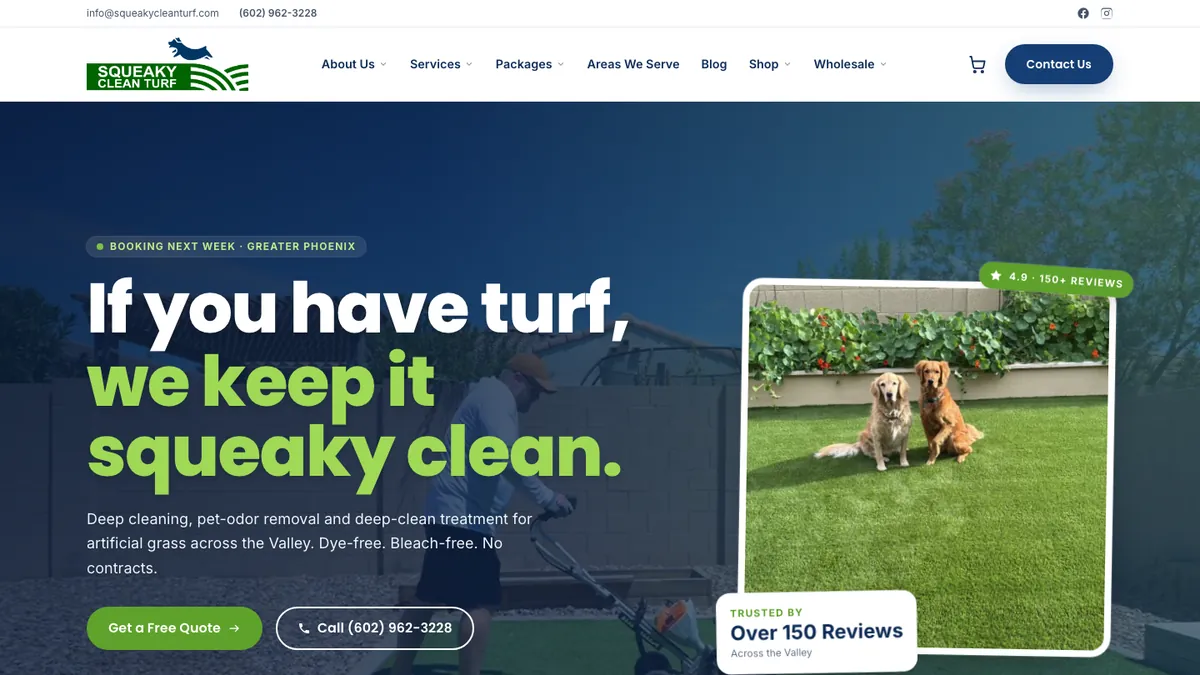
Squeaky Clean Turf website
Squeaky Clean Turf: website, headless shopify · See our work
The short answer

WordPress maintenance is the ongoing work of keeping a WordPress site secure, fast and functional: updating core, themes and plugins safely, hardening security, monitoring for malware and downtime, keeping tested off-site backups, optimizing performance, and fixing issues as they arise. Our plans include all of this plus SEO monitoring, so updates never quietly break rankings or tracking.

Who this is for

Is wordpress maintenance right for you?

  • Businesses whose WordPress site generates leads or sales
  • Sites that haven't been updated in months, or ever
  • Owners who've been hacked before or worry they will be
  • Teams without a developer on staff
What's included

What you get with our wordpress maintenance.

  • Core, theme and plugin updates, tested on staging first
  • Daily off-site backups with periodic restore tests
  • Security hardening per WordPress.org guidance
  • Malware scanning and cleanup
  • Web application firewall and bot protection (Cloudflare where possible)
  • Uptime monitoring and alerts
  • Performance optimization: caching, image compression, script cleanup
  • Core Web Vitals monitoring
  • Search Console and tracking checks after every update
  • Plugin audits to remove abandoned or redundant plugins
  • Monthly hours for small changes and fixes
  • Monthly report of updates, uptime, security and speed
How the engagement works

From first call to compounding results.

Week 1

Audit

Inventory plugins, themes, hosting, backups and security, and flag immediate risks.

Weeks 1–2

Stabilize

Take verified backups, set up staging, apply overdue updates safely, and harden security.

Weeks 2–4

Optimize

Remove plugin bloat, configure caching and CDN, and fix performance issues.

Monthly

Maintain

Run scheduled updates, monitoring, backups, reporting and small fixes.

Why sites get hacked

It's almost always a plugin.

WordPress core is actively maintained and security issues are patched quickly. Most compromises come from outdated or abandoned plugins and themes, weak or reused passwords, and hosting with poor isolation.

Our hardening follows WordPress.org's official guidance: least-privilege user roles, strong authentication with two-factor sign-in for admins, file editing disabled in the dashboard, correct file permissions, a web application firewall, and removing plugins that no longer receive updates.

Updates without surprises

Staging first, always.

Clicking "update all" on a live site is how forms stop sending, checkout breaks, or a page builder update scrambles your layout. We apply updates on a staging copy, check key pages, forms, checkout and tracking, then deploy to production with a fresh backup ready to restore.

After every update cycle we confirm Google Search Console shows no new errors, analytics and conversion tags still fire, and Core Web Vitals haven't regressed.

What we usually find

The problems we fix most often.

Abandoned plugins

Plugins with no updates in years, a common security risk.

Backups never tested

Backups that exist but fail when you actually need to restore.

Page builder bloat

Megabytes of CSS and JavaScript on every page, crushing mobile speed.

Forms silently failing

Contact forms not delivering email after a hosting or plugin change.

Pricing

How pricing works.

Monthly plans scaled by site size, traffic, ecommerce and the number of development hours included. A one-time stabilization fee applies to sites that are significantly out of date or compromised.

Arizona + nationwide

Local team, national reach.

We are based at 35094 N Jacobs Rd in Queen Creek and work with businesses across the Phoenix metro, Tucson and Northern Arizona in person, and with clients across the United States remotely. Same senior team, same process, wherever you are.

In practice

What people ask before signing a WordPress care plan.

These are the questions owners ask us after they've already been burned once, so we answer them plainly.

How much does a WordPress maintenance plan cost per month?

A WordPress maintenance plan costs whatever the scope requires: plans that only run automated updates and backups are cheap, and plans that test every update on staging and include developer hours cost more, which is the version a revenue site needs.

We price monthly by site size, traffic, whether it runs WooCommerce or memberships, and how many development hours you want included. Sites that are badly out of date or already compromised get a one-time stabilization fee first. Everything is quoted after a scoping call, month to month, with 30-day cancellation.

Here is the check I'd run on any quote. Ask the provider what happens if an update breaks your checkout or contact form at 9pm. If the answer is "we restore last night's backup," you just lost a day of orders and every form fill since. Then compare what one bad day costs you with the annual price of the plan. Start with a free audit and we'll tell you which tier your site actually needs.

Is managed WordPress hosting the same as a maintenance plan?

No. Managed WordPress hosting looks after the server, and a maintenance plan looks after the application running on it: your plugins, theme, forms, tracking and content.

The two overlap on core updates, backups and some malware scanning, which is why people assume they're covered. The gap is everything specific to your site. Your host will not check whether a form plugin update stopped emails from reaching your inbox, whether a page builder update shifted your layout, or whether your Google Ads conversion tag still fires after a theme change.

A quick test: open your hosting plan's terms and search for "plugin updates." Usually you'll find either automatic updates with no testing or nothing at all. That's fine for a hobby blog. For a site that books appointments or sells products, someone needs to own the application layer.

We work alongside your existing host rather than replacing it, and after every update cycle we confirm tracking still works. If you're unsure whether yours does, a conversion tracking audit is a good first step.

Can I maintain my WordPress site myself?

Yes, if the site is simple and you will actually do the work on a schedule, every week, not when you remember.

The routine is not complicated. Check for updates weekly. Apply them to a staging copy first, then live. Keep backups somewhere other than your host and restore one every quarter to prove it works. After each update, submit your contact form and place a test order if you sell online. Glance at Search Console for new errors once a month.

Where DIY falls apart is people, not skill. The owner gets busy, updates pile up for six months, and then one big batch breaks something at the worst time. Sites with WooCommerce, memberships or a heavy page builder also have more ways to break.

I'd rather see an owner do this consistently than pay for an automated plan nobody watches. My rule of thumb: if the site produces leads or sales and nobody on your team clearly owns it, hand it off. If you'd rather rebuild on something lighter, see our website builds.

How do I tell if a WordPress plugin is abandoned?

Look at the plugin's page on WordPress.org: if the "Last updated" date is over a year old and the "Tested up to" version is several releases behind current WordPress, treat it as abandoned and plan a replacement.

Developers set "Tested up to" themselves in the plugin's readme file, so it tells you whether anyone is still checking compatibility. Also scan the support forum. Plenty of unanswered threads from the last few months is a bad sign even if the plugin was updated recently. For premium plugins, check whether your license has expired, because an expired license usually means no updates reach your site.

In the sites I audit, the plugins flagged first are almost always the same types: old slider plugins, a form builder from years ago, and a "temporary" plugin someone installed for one landing page and forgot.

Don't just delete them on the live site. Find a maintained replacement or move the feature into the theme, test it on staging, check the pages that used it, then remove the old plugin completely so its files aren't left behind.

Sources: How Your Plugin Readme Works (WordPress Plugin Handbook)

Should I turn on automatic updates in WordPress?

Turn them on for minor core releases and low-risk plugins, and keep anything that touches checkout, forms, your page builder or tracking on a staging-first schedule.

WordPress already applies minor core security releases automatically on most sites. Plugin and theme auto-updates are opt-in, one at a time, and have been since WordPress 5.5. Without that opt-in, plugins only update in the background in special cases decided by the WordPress security team for critical fixes.

Our split looks like this. A small utility plugin on a brochure site can auto-update. A WooCommerce extension, a payment gateway or the plugin that loads your Google Tag Manager container goes through staging, because a silent break there costs real money before anyone notices.

One catch: auto-updates rely on WP-Cron. If cron isn't running, updates quietly stop. Check Tools, then Site Health, for warnings. And never turn on auto-updates without off-site backups you've actually restored. Pair it with a periodic technical SEO audit so a bad update doesn't hide in your rankings.

Sources: Plugin and themes auto-updates (WordPress.org), Upgrading WordPress: automatic background updates (WordPress Developer Resources)

What PHP version should my WordPress site run?

Your site should run a currently supported PHP version; WordPress.org recommends PHP 8.3 or greater and warns that older versions like 7.4, while still working, have reached end of life and may expose your site to security problems.

You can check yours in a minute. In the dashboard go to Tools, then Site Health, then the Info tab, and open the Server section. If it shows a 7.x version, your host is running software that no longer gets security fixes.

Hosts often leave older sites on old PHP because upgrading can break old plugins and themes, and nobody wants that support ticket. That's exactly why it gets skipped for years.

The safe way is the same as any other update. Clone the site to staging, switch staging to the new PHP version, click through key pages, forms and checkout, and watch the error log. Old or abandoned plugins are the usual cause of trouble, so this is a good moment to replace them. Then switch production and keep a backup ready. If the site is fighting you at every step, it may be time to talk about a migration.

Sources: Requirements (WordPress.org)
FAQ

WordPress Maintenance: questions we get asked.

What does WordPress maintenance include?

Regular updates of WordPress core, themes and plugins, security hardening and monitoring, off-site backups, uptime monitoring, performance optimization and fixes. Our plans also include SEO and tracking checks after every update.

How often should WordPress be updated?

Security updates should be applied promptly, ideally within days. Feature updates can follow a regular schedule after testing on staging. Leaving sites unupdated for months significantly increases risk.

Can you fix a hacked WordPress site?

Yes. We clean malware, find and close the entry point, restore from clean backups where possible, harden the site, and request removal from blocklists if Google has flagged it.

Do I need a maintenance plan if my host does backups?

Host backups are helpful but often stored on the same infrastructure, kept for short periods, and rarely tested. A maintenance plan adds independent off-site backups, tested restores, updates, security and monitoring.

Will updates break my site?

They can, which is why we test every update on staging first and keep a fresh backup ready. Most breakage comes from untested updates applied directly on the live site.

Can you make my WordPress site faster?

Usually significantly. Common wins include removing unused plugins, optimizing images, caching, a CDN, deferring third-party scripts and replacing heavy page builders on key templates.

Do you work with any WordPress host?

Yes, including SiteGround, WP Engine, Kinsta and others. We often recommend putting Cloudflare in front for security and performance.

Should I move off WordPress?

Not necessarily. WordPress is a good fit for many businesses. If maintenance costs, security or speed are persistent problems, a static or headless site can be simpler. We moved this site from WordPress to Cloudflare Pages, and our migration service covers that path.

What happens if my site goes down?

Our uptime monitoring alerts us within minutes. We diagnose the issue, whether that's hosting, DNS, a plugin conflict or an expired certificate, and restore service.

Learn from the source

The official documentation we work from.

We build to the platforms' own published guidance. These are the primary sources behind this page.

John M. Williams
Written and reviewed by John M. Williams, founder. 15+ years in paid media, $350M+ managed spend, Hero Conf 2025 and 2026 speaker. Last reviewed .
Get started · WordPress Maintenance

Tell us about your business.

Quick form, no obligation. John personally reviews every submission and replies within 24–48 hours with an honest read on whether wordpress maintenance is the right next move.

  • → Honest assessment of where you are
  • → Buddy-powered audit (if you're already running ads)
  • → Top 10 prioritized fixes (effort × impact)
  • → 30/60/90-day roadmap + scope of work

Prefer to talk first? (602) 563-6976 · hello@itallstartedwithaidea.com

By submitting you agree to a one-time review of what you share. NDAs available on request. Privacy.