It All Started With An Idea
Paid Media · Google Ads Audit

A Google Ads audit that tells you what to fix first.

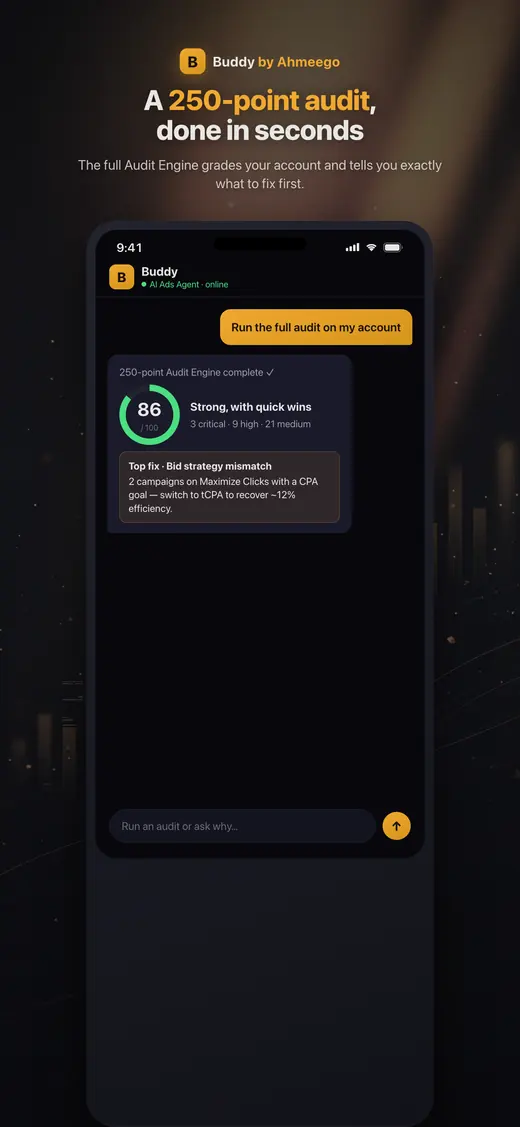
250 checks across tracking, structure, bidding, search terms, PMax, Shopping, creative and landing pages. Then a plain-English list of what to fix, in order of impact. Free for qualifying accounts.

Buddy app running a 250-point Google Ads audit
Buddy, our AI agent, on iOS and Android · See our work
The short answer

A Google Ads audit is a systematic review of an account's tracking, structure, bidding, targeting, creative and spend, designed to find waste and missed opportunities. Ours combines Buddy's automated 250-point audit engine with a senior strategist's review. You get a prioritized list of fixes ranked by impact and effort, which you can hand to your team or have us implement.

Who this is for

Is google ads audit right for you?

  • Business owners who want an independent second opinion on their agency
  • Marketing leaders inheriting an account they didn't build
  • Accounts where spend is rising but leads or revenue aren't
  • Teams preparing for a major scale-up, rebrand or site migration
What's included

What you get with our google ads audit.

  • Conversion tracking validation (tags, GA4 imports, enhanced conversions, duplicates)
  • Account structure and campaign consolidation review
  • Bid strategy and target assessment
  • Search-term analysis with wasted spend quantified
  • Negative keyword coverage and conflicts
  • Performance Max: brand cannibalization, channel mix, assets
  • Shopping and Merchant Center feed health
  • Ad copy, asset coverage and ad strength
  • Audience, location, device and schedule settings
  • Impression share lost to budget and to rank
  • Landing page relevance and speed
  • Prioritized action plan ranked by impact and effort
How the engagement works

From first call to compounding results.

Day 1

Access

Grant read-only access through our manager account. No passwords shared, and you can revoke it any time.

Days 1–2

Automated sweep

Buddy's audit engine runs 250 checks across every campaign and setting.

Days 2–5

Strategist review

A senior strategist interprets the findings in the context of your business, goals and margins.

Week 1–2

Walkthrough

A call where we walk through the top issues, estimate impact, and answer questions. No obligation.

What we look at

The ten areas every audit covers.

  1. Campaigns: performance, budgets, bid strategies, ROAS and CPA against targets.
  2. Ad groups: structure, themes, and whether they have enough data.
  3. Keywords: match types, Quality Score components and overlaps.
  4. Search terms: wasted spend and new keyword opportunities.
  5. Negatives: coverage, gaps, and negatives accidentally blocking good traffic.
  6. Ads and assets: CTR, headline and description variety, sitelinks, callouts, images.
  7. Impression share: what's lost to budget and what's lost to rank.
  8. Conversions: tracking status, counting settings, attribution and values.
  9. Audiences: performance by segment, remarketing and customer lists.
  10. Products: feed health, disapprovals and Shopping or PMax coverage.
What you get

A plan, not a PDF of screenshots.

Many audits are 60-slide decks of automated warnings. Ours is a short document with three parts:

  • Top findings: the five to ten issues that matter most, each with an estimated impact in dollars or conversions where we can quantify it.
  • Action plan: every fix ranked by impact and effort, so your team knows what to do on Monday.
  • Measurement verdict: whether the conversion data can be trusted. If it can't, that's fix number one, because every other decision depends on it.

Want to run checks yourself first? Try the free 250-point audit engine on ahmeego.

What we usually find

The problems we fix most often.

Duplicate conversion counting

The Google Ads tag and a GA4 import both counting the same purchase.

Display Network opt-in on Search

Search campaigns quietly spending on Display placements.

Location targeting set to 'interest'

Ads shown to people interested in your area, not just people in it.

Broad match without Smart Bidding

Broad keywords on manual bids, matching to irrelevant queries.

Budget-limited winners

Your best campaigns capped by budget while weaker ones spend freely.

Missing assets

No sitelinks, callouts, images or structured snippets, so ads lose rank and CTR.

Pricing

How pricing works.

The audit is free for accounts spending $3,000 or more a month on Google Ads. For smaller accounts, or for in-depth audits of complex multi-account setups, we quote a fixed fee up front. There's no obligation to hire us afterward. Many clients take the plan to their in-house team.

Arizona + nationwide

Local team, national reach.

We are based at 35094 N Jacobs Rd in Queen Creek and work with businesses across the Phoenix metro, Tucson and Northern Arizona in person, and with clients across the United States remotely. Same senior team, same process, wherever you are.

In practice

What people ask before and after a Google Ads audit.

An audit only pays off if you know when to get one and what to do with it, so these are the questions that come up around the edges.

How often should you audit a Google Ads account?

Run a full audit when you take over an account, when performance shifts without an obvious reason, and at least once or twice a year on a stable account. In between, a short monthly check catches most problems before they get expensive.

The monthly check is small: conversion action status, the search terms report, change history and budget pacing. It takes about fifteen minutes. The full audit goes through structure, bidding, ads and assets, audiences, feeds and landing pages, and it's worth doing before any big decision.

Big decisions are the real trigger. Before you raise budget, switch agencies, launch a new site or change bid strategy, audit first. Raising budget on a leaking account just buys more of the leak. If a new site is coming, pair the audit with our site migration work so tracking survives the move. Our free audit fits these moments, and results come back within 48 hours.

Sources: Review your account history - Google Ads Help

What should I fix first after a Google Ads audit?

Fix measurement first, then the bid strategy, then wasted search terms, in that order. Every other change depends on the conversion data being true.

If conversions are double counted or the wrong action is set as primary, Smart Bidding is optimizing toward a false story, and any bid change you make sits on top of it. Once tracking is right, check that each campaign's bid strategy actually matches the goal you judge it by. Then add negatives for search terms that can never convert. That cleanup is free and should happen before you raise budget, or you're buying more of the same waste.

Read the audit score as a punch list, not a grade. The top critical issue is today's job. The long tail of warnings can wait a few weeks. Our audits rank every fix by impact and effort for exactly this reason. If tracking is the problem, a conversion tracking audit comes before anything else, and target changes come after, on the bidding strategy side.

Can a Google Ads audit tell me whether my current agency is doing its job?

Yes, and you can start before any audit by checking three things you can see yourself: who owns the account, whether change history shows steady real work, and whether reporting separates brand from non-brand. You don't need to be a PPC specialist to read any of them.

Ownership first. The account should be under your business, with your billing and at least one admin from your own company. The access and security page lists every user and manager account linked to it. Next, open change history. It records changes made in the interface, Google Ads Editor, the API and automated rules, and shows who made them. Weeks of nothing, or only budget edits, tells you a lot.

Then read the reports. If brand and non-brand are blended, a strong brand campaign can hide weak everything else. Ask how they handle negative keywords and at what conversion volume they turn on Smart Bidding. A good agency answers plainly. If the answers are vague, an outside audit costs you nothing, needs only read-only access and doesn't require telling anyone. If you want a new team after that, see our Google Ads management.

Sources: About access levels in your Google Ads account - Google Ads Help, Review your account history - Google Ads Help

What date range should a Google Ads audit cover?

Use the last 30 days against the 30 before for most accounts, and stretch to 60 or 90 days when conversions are low or the sales cycle is long. You want a sample big enough that one good or bad week doesn't decide the verdict.

Three adjustments matter. Leave out the most recent days still waiting on conversion lag; Google suggests excluding days where fewer than 90% of conversions have been reported, or the latest week will look worse than it was. Check change history across the window, so you know whether a bid strategy switch or budget cut explains a shift before you blame a campaign. And compare like with like. A holiday week against a normal week tells you about the calendar, not the account.

For seasonal businesses we also pull the same period last year. For structural checks like match types, negative coverage and missing assets, the date range matters less, because those settings are either right or wrong today. Buddy's 250 checks run on whatever range you give it, so pick the range before you read the score.

Sources: Test your bid strategy (accounting for conversion lag) - Google Ads Help, Review your account history - Google Ads Help

Can AI audit my Google Ads account?

Yes, an AI agent can run the mechanical part of an audit well, checking hundreds of settings across every campaign in minutes. What it can't do alone is judge which findings matter for your business.

That's how we split the work. Buddy, John's open-source AI agent for Google Ads, connects to the live account through the Google Ads API and runs the 250-point audit. You ask for it in plain English, on the web or in the Buddy by Ahmeego app for iOS and Android, and it comes back with a score and a short list of critical issues. Buddy asks before it changes anything and labels every change so it can be rolled back.

Then a strategist reads the results against your margins, goals and history. An automated check can flag a campaign with a CPA goal on the wrong bid strategy. It takes a person to know that campaign is your brand defense and should be left alone. To try the AI half yourself, the audit engine is on our tools page. For both halves, ask for the free audit, or read how we deploy agents in AI implementation.
FAQ

Google Ads Audit: questions we get asked.

Is the Google Ads audit really free?

Yes, for accounts spending $3,000 or more a month. You get the automated 250-point sweep, a strategist's review and a walkthrough call, with no obligation.

What access do you need?

Read-only access, granted by linking your account to our manager (MCC) account. You never share a password, and you can remove access any time from your account settings.

How long does a Google Ads audit take?

Typically about one week from access to walkthrough call. Large multi-account audits may take two.

Will you make changes during the audit?

No. The audit is read-only. If you want us to implement the fixes afterward, that becomes a separate engagement.

What's the most common problem you find?

Broken or inflated conversion tracking: duplicate counting, the wrong actions marked as primary, or missing enhanced conversions. Because Smart Bidding optimizes toward that data, fixing it usually has the biggest impact.

How much wasted spend do you usually find?

It varies too much to give one honest number. Some well-run accounts have little waste, and neglected ones can have a large share of spend on irrelevant queries or placements. We quantify it for your account specifically, from your own search-term and placement data.

Can I audit my own Google Ads account?

Yes. Google's own recommendations tab and our free 250-point audit engine are good starting points. A strategist adds context: whether a warning matters for your business, and which fixes to do first.

Do you audit Microsoft Ads and Meta too?

Yes. We audit Microsoft Advertising and Meta accounts with the same framework, adapted to each platform.

How is this different from Google's Optimization Score?

Optimization Score measures how many of Google's recommendations you've adopted. Many of those increase spend. Our audit measures how well the account serves your business goals, which sometimes means ignoring recommendations.

What happens after the audit?

You keep the action plan. You can implement it yourself, hand it to your current agency, or ask us to manage the account. Engagements are month to month.

Learn from the source

The official documentation we work from.

We build to the platforms' own published guidance. These are the primary sources behind this page.

John M. Williams
Written and reviewed by John M. Williams, founder. 15+ years in paid media, $350M+ managed spend, Hero Conf 2025 and 2026 speaker. Last reviewed .
Get started · Google Ads Audit

Tell us about your business.

Quick form, no obligation. John personally reviews every submission and replies within 24–48 hours with an honest read on whether google ads audit is the right next move.

  • → Honest assessment of where you are
  • → Buddy-powered audit (if you're already running ads)
  • → Top 10 prioritized fixes (effort × impact)
  • → 30/60/90-day roadmap + scope of work

Prefer to talk first? (602) 563-6976 · hello@itallstartedwithaidea.com

By submitting you agree to a one-time review of what you share. NDAs available on request. Privacy.