It All Started With An Idea
Measurement · Server-Side

Recover the conversions your browser tags are missing.

Ad blockers, browser privacy features and consent choices quietly drop conversion data before it reaches Google, Meta or Microsoft. Server-side tracking routes events through infrastructure you control, so more of them arrive, with better data quality.

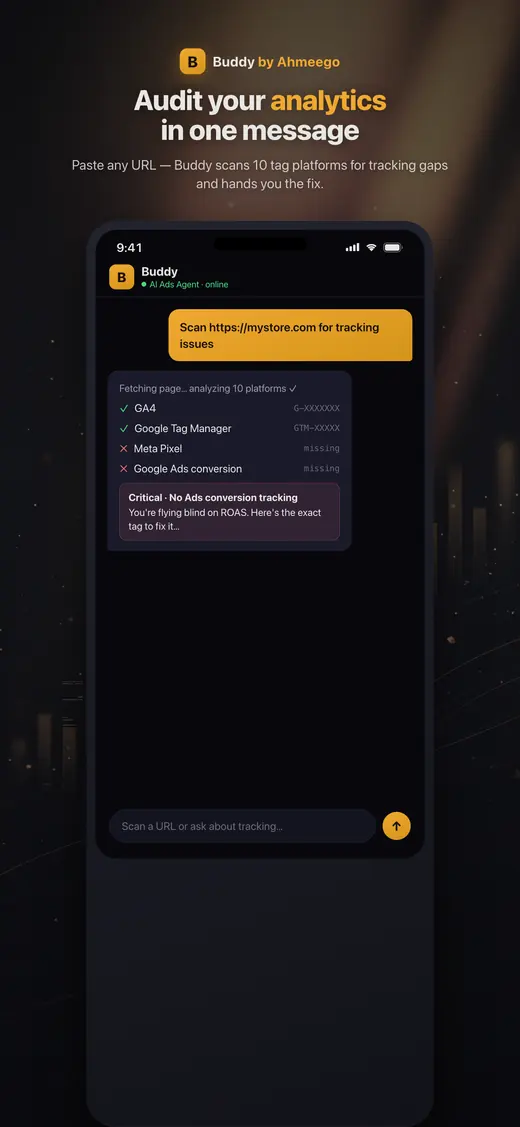
Buddy app auditing a site's analytics and tracking tags
Buddy, our AI agent, on iOS and Android · See our work
The short answer

Server-side tracking sends conversion and analytics events from a server you control, such as a server-side Google Tag Manager container, Cloudflare Zaraz, or direct platform APIs like the Meta Conversions API, instead of relying only on scripts in the visitor's browser. It improves data completeness and match quality, extends first-party cookie life, speeds up your site, and gives you control over exactly what data each vendor receives.

Who this is for

Is server-side tracking right for you?

  • Advertisers spending enough that a few percent more tracked conversions matters
  • Meta advertisers who lost performance after iOS privacy changes
  • Sites with heavy third-party script loads hurting page speed
  • Businesses that need tighter control over what data vendors receive
What's included

What you get with our server-side tracking.

  • Architecture recommendation: server-side GTM, Cloudflare Zaraz or direct APIs
  • Server-side GTM container on Google Cloud or a managed host, on your own subdomain
  • GA4 routed through the server container
  • Meta Conversions API with event deduplication against the pixel
  • Google Ads enhanced conversions
  • Microsoft UET and other platform server-side integrations
  • Consent signals passed through to every server-side tag
  • PII hashing and data minimization rules
  • Before-and-after measurement of event volume and match quality
How the engagement works

From first call to compounding results.

Week 1

Architecture

Choose the approach based on your stack, platforms, budget and privacy requirements.

Weeks 1–2

Infrastructure

Deploy the server container or Zaraz configuration on a first-party subdomain.

Weeks 2–4

Migrate tags

Route GA4, Google Ads, Meta and others server-side, with deduplication and consent.

Weeks 4–5

Validate

Compare event volumes, Event Match Quality and platform diagnostics before and after.

Options

sGTM, Zaraz, or direct APIs?

  • Server-side Google Tag Manager is the most flexible. A container runs on Google Cloud or a managed host on a subdomain of your site. It suits complex stacks with many vendors. There are hosting costs, which scale with traffic.
  • Cloudflare Zaraz runs third-party tools at Cloudflare's edge instead of in the browser. It's excellent for sites already on Cloudflare, removes heavy scripts from the page, and is simple to maintain.
  • Direct platform APIs, such as the Meta Conversions API, Google Ads offline and enhanced conversions, or Microsoft's offline imports, sent from your backend or ecommerce platform. Good for specific high-value events, and often combined with the options above.

Most implementations we build combine two of these. We recommend based on your stack, not on what's fashionable.

What it fixes, honestly

What server-side does and doesn't do.

It does: deliver events that browser-side tags lose to ad blockers and network failures, improve match rates by sending hashed first-party identifiers, let you strip or hash data before vendors see it, and reduce JavaScript on your pages.

It doesn't: override a user's consent choice. If someone declines tracking, a compliant server-side setup respects that, and consent mode modeling fills the gap. It's also not a substitute for a correct event plan. Garbage in, garbage out, just faster.

What we usually find

The problems we fix most often.

Pixel and CAPI double counting

Events sent both ways without matching event IDs.

Server container on a third-party domain

Losing the first-party benefits because the container isn't on your own subdomain.

Consent ignored server-side

Server tags firing regardless of the user's consent choice.

Pricing

How pricing works.

Fixed-fee implementation scoped by number of platforms and site complexity, plus your own hosting costs if you use server-side GTM. Monitoring and maintenance are available monthly.

Arizona + nationwide

Local team, national reach.

We are based at 35094 N Jacobs Rd in Queen Creek and work with businesses across the Phoenix metro, Tucson and Northern Arizona in person, and with clients across the United States remotely. Same senior team, same process, wherever you are.

In practice

What people ask once they start scoping server-side tracking.

These are the follow-up questions we hear after the basics are settled and someone has to decide what to actually build.

What is the difference between server-side tagging and server-side tracking?

Server-side tagging relays events that still start in the browser, while server-side tracking sends events that start in your backend, such as a paid order or a closed deal in your CRM.

With a server-side GTM container, the browser fires one request to your own subdomain and the container forwards it to GA4, Google Ads and Meta. That gives you speed and control over what each vendor sees. But if the browser tag never fires, there is nothing to forward.

Backend events don't have that weakness. The purchase exists because the order exists, not because a thank-you page loaded. The catch is that backend events carry fewer browser signals, so match quality depends on the hashed email, phone and click IDs you capture.

Most of the builds we ship use both, joined by one shared event ID so platforms merge the two copies instead of counting twice. If you're unsure what you have today, start with a conversion tracking audit.

Sources: Google Tag Manager: Server-side, Meta: Handling duplicate Pixel and Conversions API events

Do I need server-side tracking on Shopify, or are the built-in apps enough?

For many Shopify stores the native Google and Meta sales channel apps are enough to start, because they handle the standard purchase events for you and the Meta app can send them through the Conversions API, not only the browser pixel.

Where they fall short is control. You get Shopify's event definitions, Shopify's values and limited say over what data goes where. That's fine for a store selling one product line on two platforms. It gets messy when you need margin instead of revenue as the conversion value, custom events, several ad platforms that should all agree, or checkout extensions that the apps don't cover well.

A quick check: compare last month's orders in Shopify admin with purchases reported in Meta Events Manager and Google Ads. If the gap is small and the values match, leave it alone. If it isn't, or the same order shows up twice, that's when a server-side GTM layer earns its hosting bill. We cover the store side in our Shopify work.

Sources: Shopify Help Center: Pixels and customer events

Can server-side tracking send offline and CRM conversions back to the ad platforms?

Yes, and for lead generation businesses this is often where server-side work pays off most, because the sale happens days or weeks after the form fill.

The pattern is simple. Capture the click ID and the lead's email or phone when the form is submitted, store them with the lead in your CRM, then send a conversion back when the lead becomes qualified or closes. Google supports this through offline conversion imports and enhanced conversions for leads. Meta accepts the same kind of event through the Conversions API.

Why it matters: if the only conversion your bidding sees is a form fill, the algorithm learns to buy form fills, including spam and tire kickers. When it sees which leads turned into revenue, it learns to buy more of those. I'd rather feed an account fewer, truer conversions than a pile of cheap ones.

The hard part is rarely the API. It's getting sales to mark lead stages consistently.

Sources: Google Ads Help: About offline conversion imports, Google Ads Help: About enhanced conversions for leads

How do I know if my server-side tracking is actually working?

You know it's working when platform-reported conversions line up closely with your real orders or leads, each one counted once, and match quality improves after launch.

There are four checks we run, and you can run them too. First, reconcile: pick a recent week and compare orders in your store or CRM against purchases in GA4, Google Ads and Meta. Second, check deduplication: in Meta Events Manager, browser and server events for the same purchase should share an event ID and merge. Third, look at Event Match Quality in Meta and the enhanced conversions diagnostics in Google Ads. Fourth, confirm consent: decline the banner in a private window and make sure server tags respect it.

If someone hands you a server-side setup and can't show a before-and-after on those numbers, you don't know what you bought. Send the numbers to us and we'll look at them during a tracking audit.

Sources: Meta Business Help Center: About Event Match Quality, Google Ads Help: About enhanced conversions

Will server-side tracking improve my ROAS?

Server-side tracking doesn't create sales, so it won't raise ROAS on its own, but it often improves the ROAS you can act on by giving bidding a more complete and accurate signal.

Two things happen after a good implementation. Reported conversions go up because fewer are lost in the browser, so the ROAS number moves even though nothing about demand changed. Then, over the following weeks, Smart Bidding and Meta's delivery have better data to learn from, which is where real efficiency gains come from, if they come.

Be careful with the first effect. If your team sees a jump the week after launch and calls it a win, you're celebrating a measurement change. We mark the launch date in reporting and compare against orders, not just platform numbers.

If your accounts are already starved for conversions, cleaner data helps more. See how we think about this in bidding strategy.

What can you do with server-side event data beyond recovering lost conversions?

Once events flow through infrastructure you control, you can enrich them, segment them and build audiences around them, which is often worth more than the recovered conversions.

A few examples from accounts I work in. Sending profit or product category with each purchase, so bidding values a high-margin order above a low-margin one. Passing lead stage from the CRM so Meta and Google see quality, not volume. And building custom events from the page view data you already collect.

That last one is underused. In Meta Events Manager, the sample events for a page view show the URLs people came through. With a clean Conversions API setup, you can build custom events around those paths, for example people who arrived from another paid channel and then bought through Meta. That tells you a lot about how channels hand off to each other.

None of this works if the base events are wrong, so we always start with the plan in measurement.

Sources: Meta Business Help Center: About Event Match Quality
FAQ

Server-Side Tracking: questions we get asked.

What is server-side tracking?

A setup where tracking events are sent from a server you control, rather than only from scripts running in the visitor's browser. The server forwards events to analytics and ad platforms like GA4, Google Ads and Meta.

Is server-side tracking worth it?

For advertisers with meaningful spend, usually yes. Recovering conversions lost to browser restrictions improves reporting and gives bidding algorithms more signal. It also improves site speed and data control.

Does server-side tracking bypass cookie consent?

No, and it shouldn't. A compliant implementation passes consent signals to every server-side tag and respects the user's choice. Consent mode modeling estimates conversions for users who decline.

What does server-side GTM cost to run?

Hosting costs depend on traffic volume and provider. Small sites can run on modest infrastructure, while high-traffic sites need more servers. We size it during scoping and can use managed hosting to simplify.

What is the Meta Conversions API?

Meta's server-side interface for sending website, app and offline events. It's used alongside the Meta Pixel, with deduplication, to improve the reliability of conversion data.

What is Cloudflare Zaraz?

Cloudflare's tool for loading third-party scripts at the network edge instead of in the browser. It improves page speed and can send analytics and ad events server-side for sites using Cloudflare.

How do you prevent double counting?

By sending a matching event ID from both the browser and server for each event, so platforms like Meta deduplicate them, and by making sure each conversion is counted only once as a primary action in each platform.

Will server-side tracking speed up my site?

Usually. Moving vendor scripts off the page reduces JavaScript the browser has to download and execute, which can help Core Web Vitals, especially on mobile.

Do I still need GTM in the browser?

Typically yes, a lightweight web container collects events and sends them to the server container. With Zaraz, the browser-side footprint is even smaller.

Learn from the source

The official documentation we work from.

We build to the platforms' own published guidance. These are the primary sources behind this page.

John M. Williams
Written and reviewed by John M. Williams, founder. 15+ years in paid media, $350M+ managed spend, Hero Conf 2025 and 2026 speaker. Last reviewed .
Get started · Server-Side Tracking

Tell us about your business.

Quick form, no obligation. John personally reviews every submission and replies within 24–48 hours with an honest read on whether server-side tracking is the right next move.

  • → Honest assessment of where you are
  • → Buddy-powered audit (if you're already running ads)
  • → Top 10 prioritized fixes (effort × impact)
  • → 30/60/90-day roadmap + scope of work

Prefer to talk first? (602) 563-6976 · hello@itallstartedwithaidea.com

By submitting you agree to a one-time review of what you share. NDAs available on request. Privacy.