It All Started With An Idea
Measurement · GA4

GA4, set up the way it should have been the first time.

Most GA4 properties were migrated in a hurry and never revisited. We rebuild them around a measurement plan, with clean events, accurate key events, consent mode and BigQuery, so the data supports real decisions.

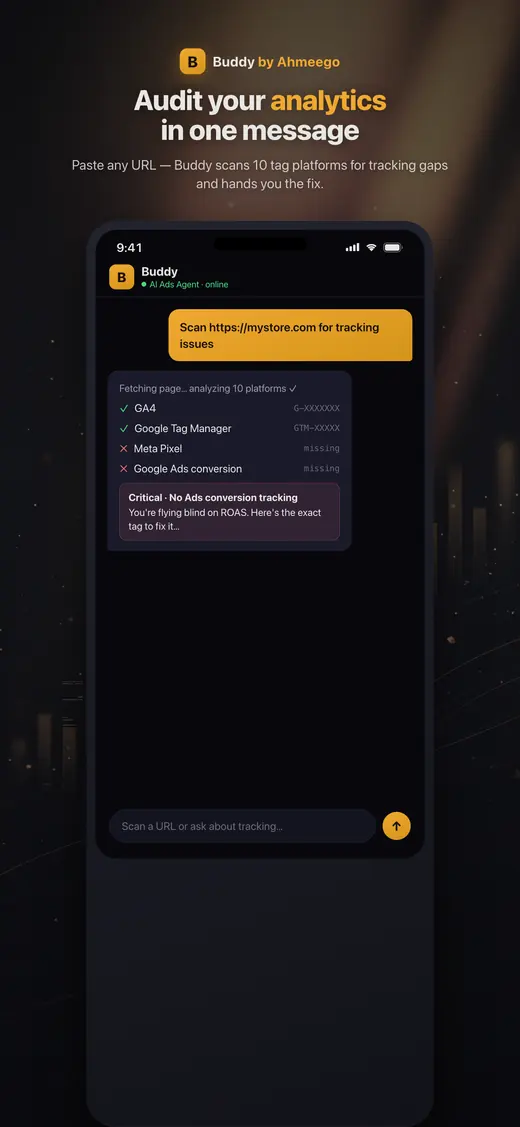
Buddy app auditing a site's analytics and tracking tags
Buddy, our AI agent, on iOS and Android · See our work
The short answer

GA4 setup means configuring Google Analytics 4 to collect accurate, decision-ready data. That covers a measurement plan, a Google Tag Manager implementation, recommended and custom events, ecommerce tracking, key events, consent mode, cross-domain tracking, data retention settings, Google Ads linking and BigQuery export. A good implementation is documented, consistent and tied to your business KPIs.

Who this is for

Is ga4 setup & implementation right for you?

  • Businesses whose GA4 property was auto-migrated from Universal Analytics
  • Ecommerce stores with missing or broken purchase and funnel events
  • Teams that don't trust GA4 numbers or can't answer basic questions with it
  • Companies needing raw data in BigQuery for analysis or modeling
  • Advertisers whose Google Ads conversions depend on GA4 imports
What's included

What you get with our ga4 setup & implementation.

  • Measurement plan mapping business questions to events and parameters
  • Google Tag Manager container audit or rebuild with a documented data layer
  • GA4 recommended events and ecommerce tracking (view_item through purchase)
  • Key events (conversions) configured and deduplicated
  • Custom dimensions and metrics for your business
  • Consent mode integration with your consent management platform
  • Cross-domain and subdomain tracking
  • Internal traffic filters, referral exclusions and data retention settings
  • Google Ads, Search Console and Merchant Center linking
  • BigQuery export setup
  • Looker Studio dashboard and team training
How the engagement works

From first call to compounding results.

Week 1

Discover

Interview stakeholders, audit the current property and container, and write the measurement plan.

Weeks 2–4

Implement

Build the data layer, tags and GA4 configuration in a staging workspace.

Weeks 3–5

QA

Test every event with GTM preview and DebugView across devices and browsers, then publish.

Weeks 5–6

Report & train

Deliver dashboards, documentation and a training session for your team.

Measurement plan

Start with questions, not tags.

The most common reason GA4 data is useless is that nobody decided what it was for. We start with the questions leadership needs answered, for example:

  • Which channels and campaigns drive revenue, not just sessions?
  • Where do people drop out of the funnel?
  • Which content leads to leads or purchases?
  • How do new and returning customers differ?

Each question maps to specific events, parameters and reports. The plan becomes the documentation your team and future agencies work from.

Common GA4 mistakes

What we fix most.

  • Data retention left at 2 months. Standard properties can keep event-level data for exploration reports for 2 or 14 months. Leaving the default limits year-over-year analysis.
  • Duplicate events. The same event fired by hard-coded gtag and by GTM, or both a page_view-based and an event-based conversion.
  • Purchase events without transaction IDs. Without a unique ID, refreshes of the confirmation page count as new purchases.
  • No BigQuery export. GA4's interface samples and thresholds data. The BigQuery export gives raw events, and standard properties can export at no license cost within daily limits.
  • Self-referrals. Payment gateways and subdomains showing up as referral sources and stealing credit from ads.
  • Consent banners blocking everything. No consent mode, so users who decline vanish entirely instead of being modeled.
What we usually find

The problems we fix most often.

Revenue doesn't match the store

Missing purchase events, currency issues or duplicate transactions.

Unassigned traffic everywhere

Broken UTMs, missing session source, or redirects stripping parameters.

Conversions imported twice

GA4 key events and native Google Ads tags both counted in Google Ads.

Pricing

How pricing works.

Fixed-fee projects scoped after a short discovery call, based on site complexity, number of domains, ecommerce requirements and integrations. Ongoing analytics support is available monthly.

Arizona + nationwide

Local team, national reach.

We are based at 35094 N Jacobs Rd in Queen Creek and work with businesses across the Phoenix metro, Tucson and Northern Arizona in person, and with clients across the United States remotely. Same senior team, same process, wherever you are.

In practice

What teams ask before and after a GA4 rebuild.

These are the GA4 questions that come up past the basics, usually from someone looking at a report that doesn't add up.

How much does a GA4 setup cost?

We quote GA4 setup as a fixed-fee project after a short discovery call, and the price depends on how many sites and domains you have, whether you sell online, and which systems GA4 needs to connect to.

A single lead-generation site with a few forms is a small project. An ecommerce store with a custom checkout, several subdomains, consent mode, BigQuery export and a CRM link is a much bigger one. Most of the cost isn't clicking settings in GA4. It is planning the events, building a clean data layer in Tag Manager, and testing every event across browsers before it goes live.

Be wary of very cheap setups that skip the plan and the testing. They usually produce a property that collects page views and little else, and you pay again to redo it. When you compare quotes, ask for the deliverables in writing: a measurement plan, the list of events and key events, a QA log, and documentation. Not sure what you have now? Start with a tracking audit.

Should we fix our current GA4 property or start over?

Fix it in almost every case, because a new property starts with no history and the old reports don't come with you.

Most broken properties are broken in the tags and settings, not the property itself. Duplicate events, missing transaction IDs, short data retention and payment gateways showing up as referrals can all be fixed in place. The history you keep stays useful for trends, even if some of it was messy. We record the date of each fix so reports can be read correctly on either side of it.

Starting over makes sense in a few cases: the property is owned by a former agency or employee and access can't be recovered, it mixes several unrelated sites, or it sits in the wrong account structure entirely. Even then, we run the old and new properties side by side for a few weeks before switching reports over. The answer is usually obvious in the first week of an audit. Our measurement practice covers the wider stack.

Can GA4 track traffic from ChatGPT and other AI assistants?

Yes. GA4's default channel group now includes an AI Assistant channel for visits from sources like ChatGPT, Gemini, Copilot and Grok, while clicks from Google's AI Overviews and AI Mode are counted as Organic Search.

That split matters. To see whether AI answers send you visitors, look in two places: the AI Assistant channel for chat tools, and Organic Search for Google's own AI features, which GA4 doesn't separate out. Some AI visits can also land as Direct when the app doesn't pass a referrer. If you want your own list, Google documents building an AI assistants channel with a regex rule in a custom channel group, placed above Referral so it catches those sessions first.

Volumes are usually small today, but these visitors tend to arrive with a specific question already answered. Make sure your key events are set up properly, then compare their conversion rate with organic search. If AI visibility is a goal, the real work happens on the content side, covered in AI search optimization.

Sources: Google Analytics Help: Default channel group, Google Analytics Help: Custom channel groups

Why do I see Unassigned traffic in GA4?

Unassigned means GA4 received traffic it couldn't match to any of its channel rules, and it is almost always a tagging problem you can fix.

The usual causes are UTM values GA4 doesn't recognize, like utm_medium=newsletter instead of email, campaign links built by hand with typos, redirects that strip parameters, and events sent through the Measurement Protocol or a server-side setup without session information. Google's own guidance on unassigned and (not set) traffic points to the same list: tag configuration that breaks session or user identity.

To find the source, open the Traffic acquisition report, filter to Unassigned, and add Session source / medium as a secondary dimension. The offender usually shows up in a minute. Then fix it where it starts: one shared UTM naming sheet, lowercase values, and the standard mediums GA4 expects. You can't edit GA4's default channel rules, but you can build a custom channel group if your naming needs it. Clean UTMs also make cost data imports line up.

Sources: Google Analytics Help: Tagging best practices to avoid unassigned, (not set), and direct traffic issues, Google Analytics Help: Default channel group

What is data thresholding in GA4, and how do I avoid it?

Thresholding is when GA4 hides rows in a report so nobody can infer who an individual user is, and it mostly appears on low-traffic reports when Google signals or demographic data is involved.

You'll see a notice in the report's data quality icon saying thresholding has been applied. Google says the thresholds themselves can't be adjusted, but you can make them less likely. Widen the date range so more users fall into each row. Switch the reporting identity to Device-based. Or turn off the setting that includes Google signals in reporting identity, which keeps signals available for audiences and Google Ads while dropping them from reports.

For small sites, the reporting identity change often makes reports usable right away, and Google notes it doesn't affect data collection or processing, so you can switch back anytime. For anything you need at full detail, use the BigQuery export, which Google lists as a way around thresholds. Signals data isn't exported to BigQuery, so expect small differences in counts.

Sources: Google Analytics Help: About data thresholds, Google Analytics Help: Reporting identity

Is GA4 HIPAA compliant?

No. Google says it makes no representation that Google Analytics meets HIPAA requirements and doesn't offer Business Associate Agreements for it, so HIPAA-regulated organizations must keep protected health information out of GA4 entirely.

In practice that means GA4 tags stay off logged-in patient portals, and off public pages tied to providing care, which Google says are more likely to be HIPAA-covered. URLs, page titles, form fields and custom dimensions can all leak sensitive details if you aren't careful, like a URL that carries a condition name and an email address.

For clinics, therapy practices and healthcare-adjacent nonprofits, we map which pages are marketing pages and which are care pages with your legal or compliance lead before tagging anything. Some organizations use a HIPAA-focused analytics tool for the sensitive parts and keep GA4 on public marketing pages only. This is a legal call as much as a technical one, so get counsel's sign-off. It comes up often in our work with ABA therapy providers.

Sources: Google Analytics Help: HIPAA and Google Analytics, Google Analytics Help: Best practices to avoid sending personally identifiable information

Can AI analyze our GA4 data for us?

Yes. Google offers an official Google Analytics MCP server that lets an AI assistant read your GA4 reports, and we connect GA4 to Buddy, our AI agent, so it flags anomalies instead of someone digging through exports.

Google's MCP server is read-only. It can run standard and real-time reports, but it can't change your settings. That is the right design: the AI asks questions of the data, and a person decides what to fix. The useful questions are specific, like which landing pages took paid traffic with no key events, where conversions dropped overnight, or which source sent sessions but no leads.

The catch is that AI can only explain what GA4 actually recorded. If the Google Ads conversion tag is missing or a purchase event fires twice, the AI will confidently explain a gap that is really broken tracking. So the order is: fix the tags first, then connect the AI. More on how we put agents to work in AI implementation.

Sources: Google for Developers: Try the Google Analytics MCP server, googleanalytics/google-analytics-mcp on GitHub
FAQ

GA4 Setup & Implementation: questions we get asked.

How long does a GA4 setup take?

A typical implementation takes three to six weeks: one for discovery and planning, two to three for build and QA, and one for dashboards and training. Simple sites can be faster.

What's the difference between events and key events in GA4?

Events are any tracked interaction. Key events, which GA4 previously called conversions, are the events you mark as most important to your business, such as purchases or lead submissions. Google Ads conversions can be imported from GA4 key events.

Should I import GA4 conversions into Google Ads or use the Google Ads tag?

For most advertisers, the native Google Ads tag with enhanced conversions is more accurate for bidding, while GA4 is better for cross-channel analysis. The important thing is not to count the same conversion both ways as a primary action.

How long does GA4 keep data?

For standard properties, event-level data used in explorations can be kept for 2 or 14 months, depending on the setting. Standard reports use aggregated data and aren't limited the same way. Export to BigQuery to keep raw data indefinitely.

Is the GA4 BigQuery export free?

Standard GA4 properties can link to BigQuery and export daily data without a GA4 license fee, subject to export limits. You pay Google Cloud for storage and queries, which for most small and mid-sized businesses is modest.

Do I need Google Tag Manager for GA4?

Not strictly, but we strongly recommend it. GTM centralizes tags, makes changes possible without code deploys, and supports server-side tagging and consent mode cleanly.

Can you set up GA4 ecommerce tracking on Shopify?

Yes. We use Shopify's customer events and pixel framework or a GTM-based approach, depending on your theme and checkout, and verify that purchase revenue matches Shopify orders.

What is consent mode and do I need it?

Consent mode adjusts tag behavior based on a user's cookie consent. It's required for advertising to users in the EEA and recommended anywhere you use a consent banner, because it enables modeled conversions for users who decline cookies.

Why are my GA4 numbers lower than my store or CRM?

Ad blockers, consent choices, browser restrictions and broken tags all reduce what GA4 records. Some gap is normal. Server-side tracking, consent mode and a QA pass usually close most of it.

Will you train my team?

Yes. Every implementation ends with documentation and a live training session on the reports and explorations your team will use.

Learn from the source

The official documentation we work from.

We build to the platforms' own published guidance. These are the primary sources behind this page.

John M. Williams
Written and reviewed by John M. Williams, founder. 15+ years in paid media, $350M+ managed spend, Hero Conf 2025 and 2026 speaker. Last reviewed .
Get started · GA4 Setup & Implementation

Tell us about your business.

Quick form, no obligation. John personally reviews every submission and replies within 24–48 hours with an honest read on whether ga4 setup & implementation is the right next move.

  • → Honest assessment of where you are
  • → Buddy-powered audit (if you're already running ads)
  • → Top 10 prioritized fixes (effort × impact)
  • → 30/60/90-day roadmap + scope of work

Prefer to talk first? (602) 563-6976 · hello@itallstartedwithaidea.com

By submitting you agree to a one-time review of what you share. NDAs available on request. Privacy.