It All Started With An Idea
Paid Media · Google Ads

Google Ads management that pays for itself.

A senior strategist and Buddy, our open-source AI agent, run your Google Ads account every day: search terms, bids, budgets, creative, feeds and conversion tracking. Month to month, and you keep full ownership.

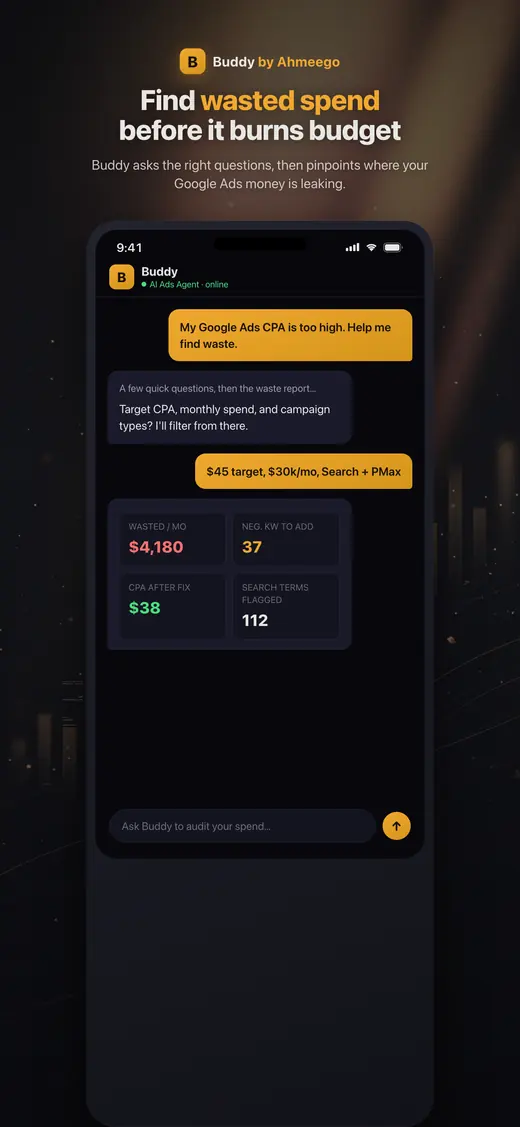
Buddy app finding wasted Google Ads spend
Buddy, our AI agent, on iOS and Android · See our work
The short answer

Google Ads management means a specialist plans, builds and optimizes your campaigns continuously so every dollar goes toward profitable clicks. Our engagements cover Search, Shopping, Performance Max, Demand Gen and YouTube. Each one starts with a free audit and is managed by the same senior strategist from day one. Expect wasted-spend fixes in the first two weeks and structural gains within 30–90 days.

Who this is for

Is google ads management right for you?

  • Businesses spending $3,000 to $500,000+ a month on Google Ads, or ready to start
  • Owners who suspect their current agency or in-house setup is wasting budget
  • Ecommerce brands where Shopping and Performance Max drive most of the revenue
  • Local service businesses (home services, healthcare, legal, education) that need qualified leads, not clicks
  • Marketing teams that need a senior specialist without a full-time hire
What's included

What you get with our google ads management.

  • Full account audit with a prioritized fix list before any changes
  • Campaign architecture for Search, Shopping, Performance Max, Demand Gen and YouTube
  • Keyword research, match-type strategy and continuous search-term mining
  • Negative keyword lists at account, campaign and ad-group level
  • Responsive search ad copy, asset testing and ad strength improvements
  • Bid strategy selection and target management (tCPA, tROAS, value rules)
  • Budget pacing and reallocation across campaigns
  • Conversion tracking audit, enhanced conversions and offline conversion imports
  • Merchant Center feed health for Shopping and PMax
  • Landing page recommendations matched to search intent
  • Weekly check-ins and a monthly business-outcome report
  • Labeled change log for every adjustment, with one-click rollback
How the engagement works

From first call to compounding results.

Week 1

Audit & measurement check

We review the account, conversion tracking, and how both tie back to revenue. You get a prioritized list of issues before anything changes.

Weeks 1–2

Quick wins

Cut obvious waste: irrelevant search terms, broken tracking, overlapping campaigns, and budget going to the wrong geographies or schedules.

Weeks 2–6

Restructure & build

Consolidate campaigns so the algorithm gets enough data, rewrite ads, align landing pages, and set the right bid strategy for each goal.

Month 2 onward

Optimize & scale

Daily monitoring with Buddy, weekly optimization and monthly strategy. Scale what's profitable and cut what isn't.

What management actually means

What happens in your account every week.

"Management" gets used loosely. Here is what happens in an account we run:

  • Every day: Buddy checks spend pacing, conversion volume and cost per acquisition against targets. It flags anomalies, like a sudden cost-per-click spike, a disapproved ad, a tag that stopped firing, or a competitor bidding on your brand, before they become expensive.
  • Every week: We review search terms and add negatives, adjust bids and targets based on recent performance, test new ad assets, and rebalance budget toward the campaigns with the best marginal return.
  • Every month: A strategy review. What worked, what didn't, what we're testing next, and how paid search is contributing to actual revenue. Not just platform-reported conversions.
  • Every quarter: A structural review. New campaign types, new markets, seasonality planning, and whether the bid strategy still fits the business goal.

Every change is labeled in the account with a date and reason. If you ever change agencies, the history stays with you.

Account structure

Fewer, better-fed campaigns.

Google's automated bidding learns from conversion data. An account split into dozens of tiny campaigns starves each one. Modern Google Ads rewards consolidation: fewer campaigns, each with enough conversion volume to optimize.

Our typical structure separates campaigns by business goal and margin, not by keyword theme:

  • Brand search, kept separate so it doesn't inflate overall performance numbers or hide weak non-brand results.
  • High-intent non-brand search, grouped by service or product line with distinct economics.
  • Shopping or Performance Max for ecommerce, segmented by margin tier or product performance where the data supports it.
  • Demand Gen and YouTube for reaching people before they search, measured against incremental lift rather than last click.

Match types follow the bid strategy. Broad match works well with Smart Bidding and a clean conversion signal. Phrase and exact give tighter control when data is thin or budgets are small. We decide account by account. Read more in how we turned broad match into an advantage.

Measurement

If the conversion data is wrong, the bidding is wrong.

Smart Bidding optimizes toward whatever you tell it is a conversion. If that's a page view, a duplicate form fire, or a phone call that lasted four seconds, Google will happily find you more of those.

So before we scale anything, we verify:

  • Primary conversions are real business outcomes: purchases, qualified leads, booked calls.
  • Nothing is double counted between the Google Ads tag, GA4 imports and third-party tools.
  • Enhanced conversions are enabled to recover conversions lost to privacy restrictions.
  • Where there's a CRM, offline conversions flow back so Google learns which leads actually became customers.
  • Conversion values reflect real margins, so value-based bidding pursues profit, not just revenue.

This is often the highest-leverage fix in the whole engagement. See our conversion tracking audit and server-side tracking services.

What we usually find

The problems we fix most often.

Brand mixed with non-brand

Brand clicks are cheap and convert well, so blending them in hides how expensive non-brand acquisition really is.

Conversions that aren't sales

Page views, scroll events or duplicate form fires counted as conversions, so Smart Bidding chases the wrong thing.

Search terms nobody reviews

Broad match and PMax without negative keyword hygiene spend on irrelevant queries for months.

Too many campaigns

Budget spread across 30+ campaigns means none have enough data for automated bidding to work.

Auto-applied recommendations

Recommendations auto-applied without review, quietly raising budgets or broadening targeting.

Landing page mismatch

Every ad going to the homepage instead of a page that answers the specific search.

Pricing

How pricing works.

We charge a flat monthly retainer plus a small percentage of ad spend, scaled to account size and quoted after your free audit. Most engagements land between $2,000 and $15,000 a month. The minimum is a $2,000 monthly management fee with at least $3,000 in monthly ad spend. Below that, there isn't enough data to optimize meaningfully. Month to month, with 30-day cancellation.

What drives the fee:

  • Monthly ad spend and number of campaigns
  • Number of campaign types (Search only vs. Search + Shopping + PMax + YouTube)
  • Ecommerce feed complexity
  • Measurement work needed (CRM integration, server-side tagging)
  • Number of locations or markets

Your ad spend is paid directly to Google from your own account. We never mark up media.

Arizona + nationwide

Local team, national reach.

We are based at 35094 N Jacobs Rd in Queen Creek and work with businesses across the Phoenix metro, Tucson and Northern Arizona in person, and with clients across the United States remotely. Same senior team, same process, wherever you are.

In practice

What owners ask before handing over their Google Ads account.

These cover whether Google Ads management is worth paying for and how to judge whoever does it, including us.

Is it worth paying someone to manage Google Ads?

It is worth it when your ad spend is large enough that better management saves or earns more than the fee, and when you do not have the hours to learn and run the account yourself. Below a few thousand dollars a month in spend, the math usually does not work.

Run the numbers honestly. Our minimum is $2,000 a month in management with at least $3,000 a month in ad spend. At that level the account has to perform meaningfully better to cover the fee, which is why we will tell you when doing it yourself makes more sense. If you are under that line, start with our guide to doing ads on a small budget.

Management pays for itself most clearly in three situations: an account wasting spend on search terms nobody reviews, conversion tracking that counts the wrong things, and growth beyond one or two campaigns. A free audit shows which of those apply to you within 48 hours, before you commit to anything.

How can I tell if my Google Ads agency is doing a good job?

Check three things in your own account: change history, the search terms report and your conversion actions. Together they show whether anyone is working, whether money is leaking and whether bidding is chasing real outcomes.

Change history lists every edit, who made it and when, going back two years. Long stretches with only automated changes mean nobody is managing. In the search terms report, sort the last 30 days by cost and look for terms with spend and zero conversions that still are not negatives. Then open conversion settings and confirm the primary actions are purchases, qualified leads or booked calls, not page views.

Also read reports past the headline. A blended cost per acquisition can improve while one campaign raises its spend and converts nothing; the winners hide the leak. Ask your agency to break results out by campaign every month and name the fix for anything that spent without converting. If they cannot, our Google Ads audit will.

Sources: Review your account history (Google Ads Help)

What access do you need to my Google Ads account?

We send a link request from our Google Ads manager account to your account's customer ID, and an admin on your side accepts it. You stay an admin on your own account, and we never ask for your login.

Linking a manager account lets our team work in your campaigns without a separate user invite for each person. You can see the link under Access and security and remove it at any time. Billing stays between you and Google, so ad spend never passes through us.

For full management we also ask for access to GA4, Google Tag Manager and Merchant Center if you sell products, because many performance problems live in tracking or the feed rather than the campaigns. Buddy works through the Google Ads API under the same permissions, asks before acting and labels every change for rollback. If you are switching from another agency, make sure someone at your company holds admin access before you remove the old agency. Our conversion tracking audit covers the tracking side.

Sources: Manager Accounts: Link accounts to your manager accounts (Google Ads Help), About access levels in your Google Ads account (Google Ads Help)

Why did my Google Ads cost per lead suddenly go up?

Usually because spend shifted toward a campaign or a set of search terms that does not convert, not because Google raised prices across the board. Find what moved before you change a bid.

We use the same order every time. First read pacing: did spend rise, fall or hold against conversions? Then split the account by campaign to find what moved. Often one campaign took a bigger share of budget and returned nothing while the others held steady. Then explain why, which almost always means opening that campaign's search terms. Only then name the fix.

The fix is often a negative keyword list plus a temporary budget cap on the leaking campaign, not a cut across the whole account that would also starve the campaigns still converting. Lowering a bid on a junk term just buys the same junk more cheaply. Recheck the same comparison next week before calling it fixed. Also rule out a conversion tag that stopped firing, a new competitor in auction insights, or a recent bid strategy change still learning. See our bidding strategy work.

Why isn't Smart Bidding working in my account?

Most often the campaign does not have enough conversions to learn from, the bid strategy contradicts the goal, or someone keeps changing settings during the learning period. Fix those three in that order.

Start by counting conversions per campaign over the last 30 days. My rule of thumb is around 30 before I trust Target CPA or Target ROAS; under that, the model is guessing. Consolidate campaigns or broaden coverage so the signal pools. Then look for mismatches. A campaign on Maximize Clicks with a CPA goal is a common one. Google does not count Maximize Clicks as Smart Bidding, it simply buys the cheapest clicks it can, and it will let you save that setup without a warning.

After switching to Target CPA or Maximize Conversions, leave bids, budgets and audiences alone for about two weeks. The first week often looks worse while the system explores. And no bid strategy replaces search term hygiene; a conversion-based strategy will still buy junk queries you never excluded. See how we pick targets on our bidding strategy page.

Sources: Your guide to Smart Bidding (Google Ads Help)

What should I do before switching Google Ads agencies?

Make sure someone at your company has admin access, record a performance baseline, and agree on a handover date so campaigns never run unattended. Do not let a new agency delete the account and start over.

The account's history has real value. Conversion data and Smart Bidding learning live in the existing account, and a fresh build throws them away. A good new manager audits first, keeps what works and restructures gradually.

Before the switch, write down the last 90 days by campaign: spend, conversions, cost per acquisition and which conversion actions are primary. That becomes the baseline you judge the new agency against. Ask the old agency for any negative keyword lists, scripts or audiences stored in their manager account rather than yours, since those can disappear when the link is removed. Then unlink the old manager account. Every change we make is labeled with a date and reason, so if you ever leave us, that history stays with you. Start with a free audit.
FAQ

Google Ads Management: questions we get asked.

How much does Google Ads management cost?

Agencies typically charge a flat fee, a percentage of ad spend, or both. We charge a flat monthly retainer plus a small percentage of ad spend, scaled to account size. Most engagements land between $2,000 and $15,000 a month, quoted after a free audit. Ad spend is billed by Google directly to you and is never marked up.

How long does it take to see results from Google Ads management?

Waste reduction shows within 1–2 weeks: negatives, tracking fixes, budget reallocation. Structural changes and bid strategy transitions take 2–6 weeks to stabilize, because Smart Bidding has a learning period after significant changes. Compounding gains from creative testing, landing pages and scaling show over 60–90 days.

What's the minimum budget for Google Ads?

Google has no platform minimum, but there is a practical one: each campaign needs enough clicks and conversions to optimize. For our managed engagements, the minimum is $3,000 a month in ad spend plus a $2,000 management fee. Below that, we'd rather point you to our free tools and audit than take your money.

Will I own my Google Ads account?

Always. The account is created under your business and billed to your payment method. We get manager access through our MCC, and you can remove it at any time. Campaigns, history, audiences and conversion data stay with you.

Do you use Google's auto-apply recommendations?

Rarely, and never for anything that changes budgets, bidding or targeting without review. Some recommendations are useful. Many mainly increase spend. Buddy reviews them and we apply the ones that fit your goals by hand.

Should I use broad match keywords?

Broad match works well with Smart Bidding, a reliable conversion signal and strong negative keyword hygiene, because it finds queries you wouldn't think of. With thin conversion data or tight budgets, phrase and exact match give more control. We decide by account and test changes in controlled experiments.

Do you manage Performance Max campaigns?

Yes. We structure asset groups around audience and product themes, add audience signals and search themes, apply brand exclusions and negative keywords where available, and use channel and search-term reporting to keep PMax honest. See our Performance Max service.

What's the difference between your Google Ads management and paid search service?

Paid search covers both Google and Microsoft search engines together. Google Ads management covers the full Google Ads platform: Search, Shopping, PMax, Demand Gen and YouTube. Many clients use both.

How do you handle competitor bidding on our brand?

We monitor auction insights and brand search terms. If competitors bid on your brand, we make sure your brand campaign holds top position efficiently. If they use your trademark in ad text, we can help you file a trademark complaint with Google.

Can you manage Google Ads for multiple locations?

Yes. We build location-level campaigns or use location assets and geo bid adjustments depending on volume, and report by location so each manager sees their own results.

What reports will I get?

A monthly report focused on business outcomes: leads or sales, cost per acquisition, return on ad spend, and what changed and why. Plus a live dashboard and weekly check-ins. If your CRM is connected, we report on closed revenue as well as form fills.

Are you a Google Partner?

We focus our time on client results and on Buddy, our open-source Google Ads agent, rather than on badge programs. Our founder has 15+ years and $350M+ in managed spend, and you can audit our approach on GitHub. Ask us for references in your industry.

Learn from the source

The official documentation we work from.

We build to the platforms' own published guidance. These are the primary sources behind this page.

John M. Williams
Written and reviewed by John M. Williams, founder. 15+ years in paid media, $350M+ managed spend, Hero Conf 2025 and 2026 speaker. Last reviewed .
Get started · Google Ads Management

Tell us about your business.

Quick form, no obligation. John personally reviews every submission and replies within 24–48 hours with an honest read on whether google ads management is the right next move.

  • → Honest assessment of where you are
  • → Buddy-powered audit (if you're already running ads)
  • → Top 10 prioritized fixes (effort × impact)
  • → 30/60/90-day roadmap + scope of work

Prefer to talk first? (602) 563-6976 · hello@itallstartedwithaidea.com

By submitting you agree to a one-time review of what you share. NDAs available on request. Privacy.